





A 1998 disposable camera and a 2003 pocket digicam can point at the same moment and make it feel like two different memories. The reason is not one magic “vintage” color grade. Film, lens, flash, processing, sensor behavior and the final print or JPEG all leave different fingerprints.
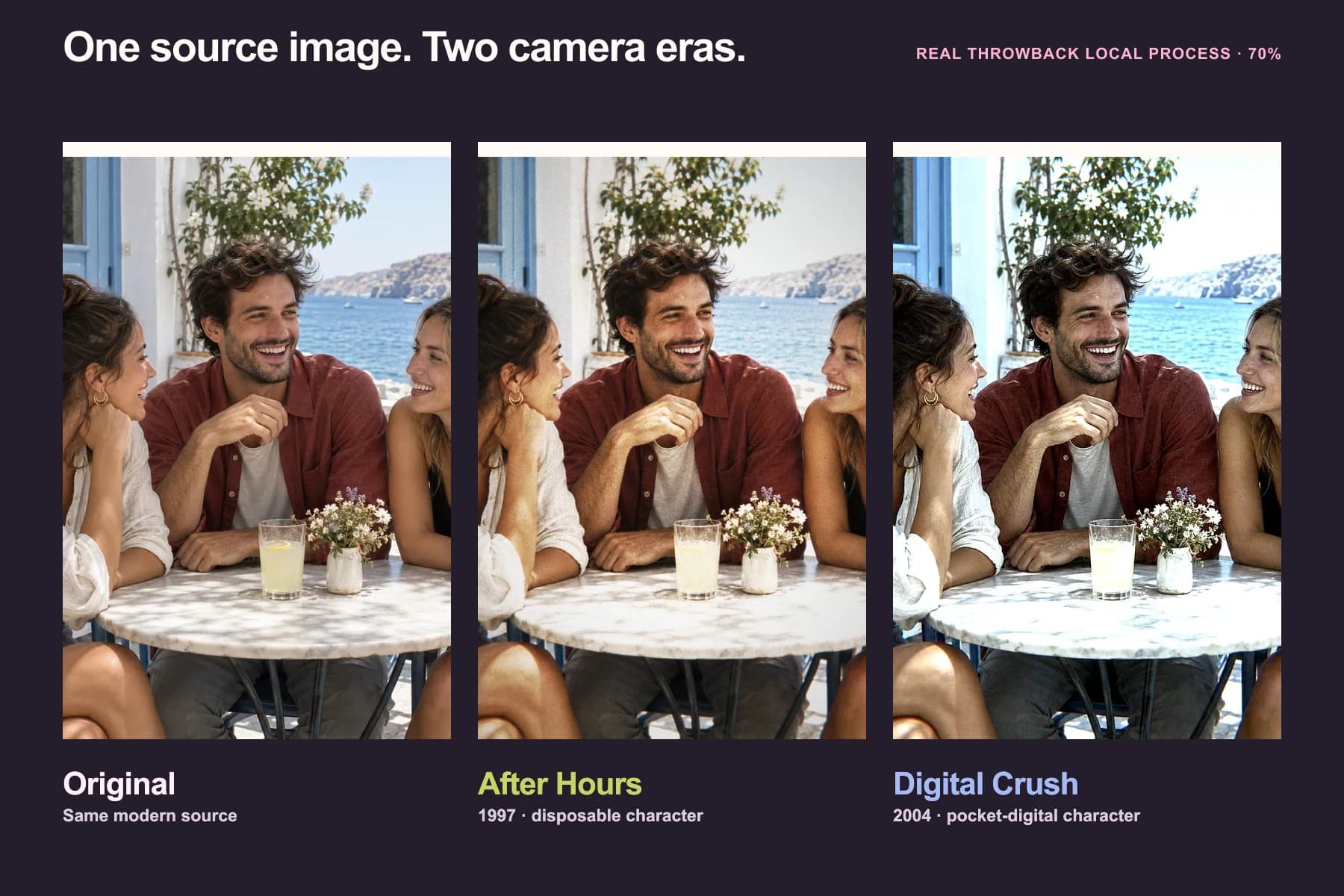
This article uses one AI-generated fictional modern source image, created for the experiment, and two real Throwback local processes to make those differences easier to see. The source is editorial imagery; After Hours and Digital Crush are the authentic product outputs, rendered from that exact image at the same 70% intensity with Throwback’s local, non-generative camera engine. After Hours interprets a late-1990s disposable-camera chain. Digital Crush interprets an early-2000s compact-digital chain. The dates are creative reference points, not claims about when the source image was made.
What a late-1990s disposable camera was actually doing
Single-use cameras traded control for immediacy. Fujifilm’s current QuickSnap specification is a useful description of the enduring format: ISO 400 color-negative film, a plastic 32 mm f/10 fixed-focus lens, one fixed shutter speed and a built-in flash. The exact film and settings varied between models and years, but the architecture explains why the camera had a recognizable kind of limitation. See Fujifilm’s QuickSnap specification.
The photograph was not finished when the shutter clicked. The exposed film still had to be developed, then printed or scanned. Film stock, exposure, processing and the output medium all influenced what people remember as “the disposable-camera look.” Kodak’s own timeline records that its one-time-use camera recycling program had already handled more than 100 million cameras by February 1997, which helps place the format inside everyday late-1990s picture culture. See Kodak’s company milestones.
In the Throwback experiment, After Hours does not pretend to be one exact historic camera-and-lab combination. It is an authored process: broader midtone grain, warmer flash behavior, uneven color, softer edges and a separate print curve. On this source, the people and place stay intact while the image becomes less clinically even.
What changed when the pocket digicam arrived
By 2003, mainstream compact digital cameras were doing much more of the finishing inside the camera. Canon’s archive describes consumer models from that year with 3.2-megapixel CCD sensors, autofocus, automatic exposure and white balance, dedicated image processors and memory-card storage. The details differed by manufacturer and model; “CCD” never meant one universal palette. See Canon’s 2001–2004 camera history.
The important change was the chain. Instead of negative film followed by a lab, a small sensor captured the scene and the camera’s electronics interpreted it. Exposure, white balance, sharpening, noise reduction, color rendering and compression could all shape the JPEG before anyone opened the file.
Digital Crush interprets that early-digital character. On the same source, bright areas reach their limit more abruptly, small edges become harder, shadows carry finer digital texture and color detail feels more compressed. The result is cleaner than the disposable treatment in some places and less forgiving in others.
Same source, different weaknesses
| Look at… | After Hours | Digital Crush |
|---|---|---|
| Bright surfaces | Warmer, more gradual print-like response | Brighter and more abruptly clipped |
| Fine detail | Broader texture and softer edges | Harder edge contrast and finer digital noise |
| Color | Uneven color-negative and print character | Cooler highlights, compressed color detail |
| Shadows | Grain sits through the midtones and darker areas | Small-sensor texture and processing feel more electronic |
| Overall impression | A developed snapshot | A finished in-camera file |
These are observations about the two visible Throwback outputs, not a laboratory comparison of every disposable camera and every CCD compact. Real cameras varied widely. A 2003 Canon, Sony, Olympus and Fujifilm model could disagree about color and sharpening even when they used similar sensor technology.
Flash is part of the answer, not the whole answer
Both aesthetics are associated with direct flash because small, social cameras were often used indoors, at parties and at night. A nearby flash can make foreground faces bright while the background falls away. But the same lighting does not erase the capture medium.
The comparison source on this page is a daylight scene, not an original flash exposure. Throwback’s processes respond to its existing light and tonal structure; they do not reconstruct the physically exact light path of a flash that was never there. This is why the process pages recommend starting with an image whose light already supports the look.
If you want a convincing party result, use a close subject, visible directional or frontal light and enough shadow detail for the treatment to shape. Keep the intensity low enough that faces still hold useful information.
CCD, digicam and Y2K are related—not synonyms
Digicam is the useful broad term for the compact digital camera experience. CCD names one sensor technology used by many cameras of the period. Y2K is a wider cultural label that can include fashion, graphics, interfaces and styling as well as photography.
The period look therefore did not come from the sensor alone. Lens design, flash, exposure, white balance, the manufacturer’s image processor, sharpening and JPEG settings all mattered. Treating every old digital photograph as “CCD color” hides the more interesting truth: early digicams had character because the whole camera pipeline made visible decisions.
Which Throwback process should you use?
Use After Hours when you want the same people, place and composition with warmer film-and-print character, broader grain and imperfect edges. It opens directly into the disposable-camera process in Studio.
Use Digital Crush when you want bright early-digital highlights, harder detail, small-sensor texture and JPEG-style color compression. It opens directly into the digicam process in Studio.
Both run locally in the browser. Neither is a generative AI Time Portrait: the people, clothing, objects and scene remain the source image. If the goal is to rebuild the wider scene as another decade, that is the separate, consent-based AI Time Portrait experience.
For the wider era context, explore Throwback’s 1990s photography guide and 2000s photography guide.
What this experiment proves—and what it does not
It proves that two deliberately different camera-process treatments can make the same source read as film-era or early-digital without replacing the scene. It also gives you a fair visual comparison because subject, framing and base image stay fixed.
It does not prove that every photograph made in 1998 looked like After Hours, or every photograph made in 2003 looked like Digital Crush. Those dates frame the comparison; the Throwback processes are broader era interpretations and retain their 1997 and 2004 product anchors. They are not camera-identification claims, forensic simulations or documentary evidence.
That limitation is useful. The best retro treatment is not the one that piles on the most artifacts. It is the one whose light, texture, color and edge behavior agree with one another—and still leaves the photograph worth keeping.