
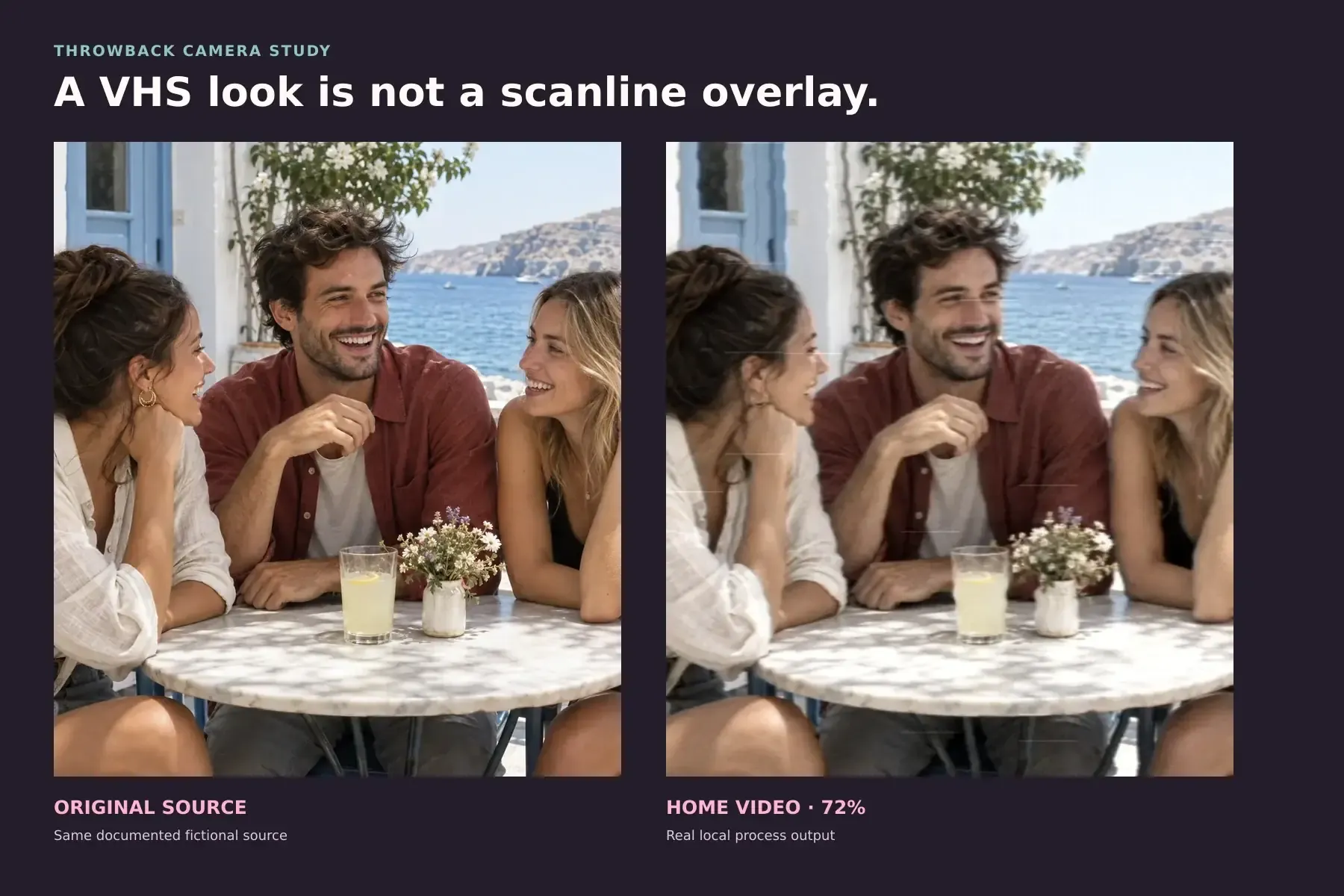


A believable VHS filter for photos should change horizontal detail, color bandwidth and line stability together. It should not simply place dark scanlines, a timestamp and random glitches over a sharp modern image. The most convincing still looks like one paused frame from an imperfect video signal, while the people and scene remain recognizably intact.
This article uses a documented fictional source image and a genuine result from Throwback's local Home Video process at 72% intensity. The result is a VHS-inspired rendition, not historical photography or a claim that every tape, camcorder and deck looked the same.
The short version: soften sideways before adding decoration
The detail people remember from VHS is not a uniform low-resolution blur. A video system can preserve a different amount of information horizontally than vertically, and it can carry much less color detail than brightness detail. That combination makes small color transitions spread sideways while larger shapes remain readable.
This distinction matters because the often-cited figure of 240 TVL concerns horizontal resolution per picture height. It does not mean that a VHS frame contains only 240 rows. Analog Devices explains how television-line resolution and bandwidth relate, while the normal-VHS specification in this JVC instruction manual lists more than 240 lines of horizontal resolution.
Throwback's Home Video process treats brightness and color separately for that reason. It reduces horizontal color bandwidth more aggressively than brightness bandwidth, shifts the color slightly, introduces restrained line-by-line instability and keeps stronger tracking disturbance near the bottom edge.
What the same-source test reveals
The source scene and the Home Video result contain the same people, objects and framing. No new scene was generated. Look first at the boundaries between skin, clothing and the background. In the processed frame, brightness edges remain legible, but color crosses those edges more readily.
Then look near the lower part of the result. The instability is concentrated rather than sprayed evenly across the entire picture. This matters visually: a real signal problem has a direction and a location. Random glitch stickers do not.
At 72%, the treatment is deliberately visible enough to study. For a photograph you plan to keep, a lower setting may be more persuasive. The right intensity depends on the source, especially its existing sharpness, lighting and color contrast.
Why scanline overlays usually look like a screen, not a tape
Evenly spaced horizontal lines suggest the visible structure of a display. They do not, by themselves, explain how a picture was recorded onto tape, carried as a video signal or disturbed during playback. Adding them to an otherwise pristine image often creates a poster treatment rather than a paused home movie.
The same problem appears with oversized timestamps, heavy RGB splitting and glitches placed in every corner. Those cues can be useful in graphic design, but they are not required evidence of VHS. A convincing effect can work without any timestamp at all.
The better question is not "Which VHS sticker should I add?" It is "Which parts of the signal should lose precision first?" For this interpretation, the answer is horizontal color detail, followed by restrained line instability and sparse dropout behavior.
A practical order for building the look
If you are judging a VHS photo effect, check it in this order:
- Color bandwidth: Fine red-blue or skin-background transitions should spread horizontally more than the brightness structure does.
- Luma detail: The image should feel softer sideways without collapsing every vertical edge into the same blur.
- Line stability: Small rows can wander, but the subject should not look melted or geometrically rebuilt.
- Dropouts: Use sparse interruptions. A frame covered in identical noise marks feels procedural.
- Tracking behavior: Keep the strongest disturbance close to an edge, usually the bottom, rather than distributing it uniformly.
- Decoration: Add dates, borders or display lines only when the design calls for them, not as proof that the image is VHS.
This order is also useful when choosing a source. A photograph with readable color boundaries and some detail near the lower edge gives the process something to reveal. If the source is already tiny, blurred or heavily compressed, extra tape artifacts may only hide it.
What one still image cannot recover
A photograph can be treated to resemble a paused camcorder frame, but it cannot recover motion that was never captured. There are no adjacent frames, no head-switching history from a physical deck and no authentic tape generation hidden inside a modern still.
Home Video therefore does not claim to simulate every part of an RF signal or tape transport. It is an authored camera-process interpretation built from bounded horizontal bandwidth, color separation, line-correlated jitter, sparse dropouts and bottom-edge tracking instability. It also does not identify which camcorder made an old image.
That boundary separates it from Throwback's generative tools. A local camera process preserves the source scene. An AI photo transformation can rebuild clothing, surroundings and other scene content. They solve different problems.
Make the effect with Throwback Home Video
Open the Home Video process in Studio, choose a photo and adjust the intensity while comparing it with the original. The camera process runs locally in the browser and keeps the source composition intact.
Start below the test's 72% setting if the photograph already has soft detail. Increase the treatment until horizontal color spread and tape instability become visible, then step back if faces or small objects stop reading clearly. Restraint is usually more convincing than maximum damage.
You can also browse the wider Era Packs collection, compare this signal-based look with the film and digital processes in Disposable Camera vs Digicam, or explore the broader 1990s photography guide.
The final test is simple: hide the timestamp, border and decorative overlays. If the frame still reads as paused home video because its detail, color and line behavior agree, the effect is doing real work.